10CH WiFi Camera System: Reliable Coverage for Every Zone
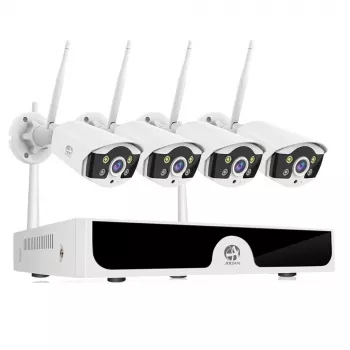
10CH WiFi Security Camera System: Simple Whole-Property Coverage Without Rewiring the House
A security setup should feel dependable day after day, not like a weekend project that never ends. A 10-channel WiFi security camera system is built for properties that need more than “a camera by the door”—think driveway, yard, side gates, garage, entry points, and shared indoor areas. Our team put this guide together around practical planning: what to cover, where to place cameras, how to keep footage private, and how to build a system that stays useful as routines change.
Why a 10-channel system makes everyday security easier
If you’ve ever tried to piece together coverage with a couple of standalone cameras, you already know the pain: gaps, mismatched settings, and alerts that don’t tell the full story. With 10 channels, you can design coverage that matches how your property is actually used.
- Cover more than one angle per priority area (for example: driveway overview plus a tighter shot at the license-plate-height zone) without juggling separate apps and logins.
- Keep the system consistent as needs grow—add cameras for a new shed, a second entrance, or a home office without starting over.
- Reduce blind spots created by corners, fences, landscaping, and parked vehicles by spreading coverage across the property.
- Create a clearer timeline when something happens (delivery, visitor, gate left open) by having adjacent viewpoints instead of a single clip with missing context.
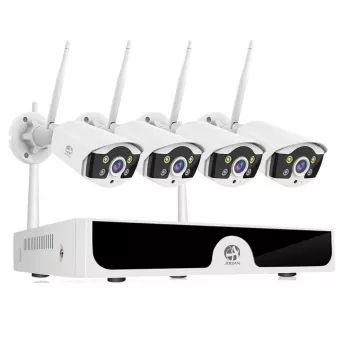
If you’re ready to build whole-property coverage in one coordinated setup, our 10CH WiFi Security Camera System is designed for exactly that kind of layout planning.
A practical coverage plan (start with priorities, not camera count)
The fastest path to a useful system is starting with the “why” for each camera, not trying to use all 10 channels immediately. We recommend mapping your property and labeling the areas that matter most.
- Map the “must-have” zones first: main entry/porch, driveway, garage, and any ground-level doors.
- Add “risk-reducers”: side yard path, gate line, back patio, and any hidden corners that a visitor could approach from.
- Include at least one interior viewpoint that helps confirm whether an alert is real (for example: entry hallway facing the front door area).
- Plan overlap: each exterior door is easiest to verify when there are two views—one showing the approach path and one showing the door area itself.
- Decide what not to record: neighbors’ windows, public sidewalks beyond your property line, and private indoor areas. Point cameras to what needs protection and nothing more.
Example channel allocation for common properties
| Area to cover | Goal | Recommended viewpoints (channels) |
|---|---|---|
| Front door/porch | See faces and packages clearly | 1–2 (door area + approach) |
| Driveway | Track vehicles and deliveries | 1–2 (wide overview + tighter angle) |
| Garage/garage door | Confirm open/close events and access | 1 |
| Side yard/gate | Catch walk-up approaches | 1 |
| Back patio/yard | Watch entry points and activity zone | 1–2 |
| Indoor entry/hallway | Verify entry events after alerts | 1 |
| Spare capacity | Future expansion (shed, basement door, pool area) | 1–2 |
WiFi reliability: keep the system stable day and night
WiFi is the foundation of a wireless camera system. The best camera angle won’t help if the feed drops right when you need it.
- Treat WiFi like the foundation: camera placement should follow dependable signal strength, not just the perfect viewing angle.
- Use a “distance and walls” rule of thumb: exterior walls, brick, concrete, and metal cladding reduce signal; closer is better.
- If a camera location is ideal but far from the router, consider moving the router, adding a mesh node, or using a dedicated access point so the camera stays connected.
- Create a consistent network name and password for the system to avoid reconfiguring devices after small home-network changes.
- Keep firmware and router security settings current so the system stays protected over time.
For deeper device and router hardening basics, you can also reference consumer-facing guidance from CISA and the FCC.
Placement rules that make footage more useful (and reduce false alerts)
Good placement isn’t just about “seeing more.” It’s about capturing usable details, cutting down noise, and getting clips that answer real questions quickly.
Privacy and access control: keep security footage private
If you want a widely used baseline for home network security concepts, NIST is a solid reference point.
A smooth setup checklist that prevents “redo everything” frustration
When this system is a strong fit
If you’re building a broader “ready-for-anything” setup, many customers pair security planning with everyday essentials—like a reliable light source or audio on the go. If that’s you, you may also like our LED Flashlight Smart Watch with Bluetooth Calling & 100+ Sports Modes and our Wireless Earbuds TWS Bluetooth 5.3 – Low Latency, HiFi Sound, Waterproof.
FAQ
How many cameras should be active on day one with a 10-channel system?
Start with your highest-priority zones—typically the front door/porch, driveway, and one secondary entrance—then expand once WiFi stability and motion alerts are dialed in. A staged rollout helps you avoid alert overload and makes it easier to troubleshoot one location at a time.
Will WiFi cameras work reliably through exterior walls?
They can, but reliability depends heavily on distance and what the walls are made of, since brick, concrete, and metal surfaces reduce signal strength. Test signal at the exact mounting spot and consider a mesh node or dedicated access point if the connection isn’t stable.
How can false motion alerts be reduced without missing real events?
Reduce false alerts by narrowing activity zones, lowering sensitivity in high-traffic frames, and avoiding trees or busy roads in view when possible. Tune one camera at a time and use side-to-side “path framing” so motion is easier to verify without constant triggering.














Leave a comment