Ultra-Light 8KHz Wireless Mouse Setup for Competitive Play

Ultra-Light 8KHz Wireless Gaming Mouse: Speed, Control, and Comfort in One Shell
An ultra-light mouse with an 8KHz polling rate is built for faster aim corrections, cleaner tracking, and less fatigue over long sessions. The combination can feel like a “tighter” connection between hand movement and on-screen response—when the rest of the setup (PC, USB path, game engine, and monitor refresh rate) can keep up. Below is a practical guide to what 8KHz changes in real play, how to choose the right weight and shape, and how to set it up for stable performance across common game genres.
What Makes an Ultra-Light 8KHz Wireless Mouse Different
Ultra-light designs reduce the effort needed to start, stop, and redirect the mouse. That helps with micro-adjustments in aim, quick target swaps, and repeated lift-and-reset movements—especially during long sessions where hand strain adds up.
An 8KHz polling rate means the mouse reports its position to the PC up to 8000 times per second. When everything is stable, those more frequent updates can reduce perceived input delay and make fine tracking feel smoother. Wireless performance still depends on a strong 2.4GHz connection, smart receiver placement, and interference control.
Real-world gains vary. Some players feel the improvement instantly, while others prefer a lower polling rate that’s easier on system overhead and battery life. The goal is consistent performance, not chasing the highest number.
Specs at a Glance
Use the checklist below to compare models quickly—then confirm what’s actually included in the box (receiver, extender, cable, grips, spare feet) before buying.
| Feature | Why It Matters | What to Verify Before Buying |
|---|---|---|
| 8KHz polling (8000Hz) | More frequent updates can reduce perceived latency and improve tracking smoothness | PC performance, available USB port, and whether 8K works in wireless mode |
| Ultra-light weight | Less effort to start/stop movement; easier flicks and micro-corrections | Actual weight, balance, and whether the shell flexes under grip |
| 2.4GHz wireless | Lowest-latency wireless option for competitive play | Receiver range, extender/dongle placement, interference in the play area |
| Sensor quality | Tracking consistency and lift-off behavior affect aim reliability | DPI steps, IPS/acceleration specs, and whether smoothing is disabled at chosen DPI |
| Battery and charging | Higher polling can increase power draw | Battery life at 1K vs 8K, charge time, play-while-charging support |
| Feet and surface compatibility | Glide influences control and stopping power | PTFE feet quality, replacement availability, mousepad type |
8KHz Polling in Practice: When It Helps (and When It Doesn’t)
8KHz tends to shine most on high-refresh monitors where smaller timing differences are easier to notice. It can also help players who prioritize smooth, continuous tracking—particularly in aim-heavy shooters—assuming frame pacing is stable.
There are tradeoffs. Very high polling can increase CPU/USB overhead, and some systems respond better to 2K or 4K than a full 8K. Some games (or certain anti-cheat environments) may behave differently across polling rates, so it’s smart to test 1K, 2K, 4K, and 8K for consistency.
For deeper background on USB behavior and HID fundamentals, the USB-IF resources are a reliable reference.
Wireless Setup for Low Latency and Fewer Dropouts
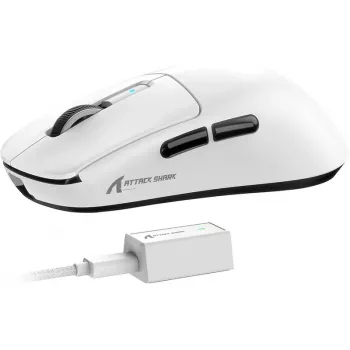
Even a great sensor can feel “off” if the wireless link is unstable. Start with receiver placement: keep the receiver close to the mouse, ideally using an included extender so it sits near the front edge of the desk. When possible, use a rear motherboard USB port rather than a noisy front-panel hub.
Interference matters. Keep the receiver away from USB 3.0 devices (which can be noisy in the 2.4GHz range), Wi‑Fi routers, and dense cable bundles. If stutter appears at 8KHz, reduce polling to 4K or 2K and retest. A stable 4K often beats an unstable 8K in real matches because the aim “feel” stays predictable.
Finally, don’t overlook the basics: clean mousepad, consistent surface, and a cable-free receiver path all reduce random tracking anomalies.
Weight, Shape, and Grip: Choosing Comfort Without Sacrificing Control
DPI, Sensitivity, and Calibration Tips for Consistent Aim
Disable pointer acceleration for predictable movement. On Windows, the relevant settings are covered in Microsoft Support. After that, match polling rate to what your system handles reliably. If 8KHz causes irregular frame pacing or inconsistent feel, stepping down to 4K or 2K can restore a more dependable response.
Battery Life Expectations at Higher Polling Rates
Who This Mouse Style Suits Best
Ultra-Light 8KHz Wireless Gaming Mouse Product Pick
If the goal is a focused, competitive-ready option, the Ultra-Light 8KHz Wireless Gaming Mouse is built around the core formula: ultra-light handling plus very high polling capability. Best results come from careful receiver placement and choosing the highest polling rate that stays stable on your current PC.
- Wireless Earbuds TWS Bluetooth 5.3 – Low Latency, HiFi Sound, Waterproof for casual play, commutes, and backup audio when a wired headset isn’t convenient
- LED Flashlight Smart Watch with Bluetooth Calling & 100+ Sports Modes for quick notifications and timers without leaving the desk
FAQ
Does 8KHz polling make a noticeable difference in games?
It depends on monitor refresh rate, the game engine, and overall system stability. Some players notice smoother tracking and slightly tighter response, while many setups feel best at 2K–4K for consistency.
Will 8KHz polling reduce battery life on a wireless mouse?
Yes, higher polling usually increases power draw, so battery life is typically shorter at 8K than at 1K. If battery life matters, use 1K for everyday use and switch higher for competitive sessions.
What should be changed first if there’s stutter or instability at high polling rates?
Move the receiver closer (use an extender if available), try a different rear motherboard USB port, and avoid hubs. If it persists, step down from 8K to 4K or 2K and recheck background CPU load.














Leave a comment