Everyday TWS Earbuds: Bluetooth 5.3, Low Lag, Waterproof
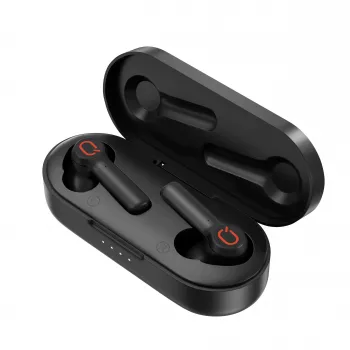
Wireless Earbuds That Fit Real Life: Stable Bluetooth, Low Lag, and Sweat-Friendly Design
True wireless earbuds have become the go-to for commuting, workouts, and everyday calls because they remove the cable clutter without adding much bulk. This TWS set focuses on the practical essentials: Bluetooth 5.3 for a steadier link (device support varies), low-latency playback that helps video and gaming feel more synchronized, HiFi-style tuning aimed at clearer detail, and a waterproof build meant for sweat and light rain. If you’re upgrading from wired earbuds or an older Bluetooth pair that drops connection and lags behind on video, this is a simple, budget-friendly step up.
What Makes These Earbuds a Practical Daily Pick
- True wireless convenience: No cable tugging, easier pocket carry, and quick “grab-and-go” listening.
- Bluetooth 5.3 benefits: Designed for improved power efficiency and connection behavior compared with older generations, though real-world results depend on your phone/tablet and environment. For reference, Bluetooth versions and feature notes are documented by the Bluetooth SIG Core Specifications.
- Low-latency focus: Aims to reduce the “audio behind the picture” feeling during streaming, social clips, and casual mobile gaming.
- HiFi-style sound tuning: Built to keep vocals intelligible and instruments clearer instead of turning everything into heavy bass.
- Waterproof build: Added confidence around sweat, rain, and splashes (check the exact rating on your model listing). Water-resistance classifications are commonly tied to IP concepts described in IEC 60529 (IP Code) overview.
- Value-first upgrade: Useful if you want modern daily features without paying premium-headphone pricing.
Bluetooth 5.3 Connection and Pairing Experience
Setup is usually straightforward: open the charging case, enable Bluetooth on your phone/tablet/PC, select the earbuds from the list, and confirm the connection. In crowded RF spaces—like gyms, buses, or busy offices—Bluetooth 5.3 can help reduce dropouts, but your device’s antenna quality and local interference still matter.
Small habits that improve day-to-day stability
- Keep firmware/OS updated: Bluetooth behavior is often influenced by system updates.
- Mind body blocking: If your phone is buried in a back pocket, your body can weaken the signal—especially in dense areas with lots of competing wireless traffic.
- Store in the case between uses: Besides charging, it helps avoid random reconnections and keeps the earbuds protected.
- Switching devices: If the model doesn’t support seamless multi-device switching, disconnect from one device first before pairing to another.
- Call clarity tip: Keep the phone within a short, unobstructed range indoors where walls, metal objects, and appliances can affect signal consistency.
Low Latency in Real Life: Video, Gaming, and Calls
Low latency matters most when your eyes expect audio to match instantly—speech in videos, lip sync in movies, and quick sound cues like footsteps or action effects in games. With everyday earbuds, actual delay depends on more than the earbuds themselves: the phone’s Bluetooth stack, codec support, app behavior, and whether a dedicated low-latency or “game mode” is available.
How to reduce perceived delay
- Stay close to your device: A stronger connection tends to behave more consistently.
- Close heavy background apps: Busy devices can add processing delays that feel like “Bluetooth lag.”
- Disable extra audio effects: Some spatial or enhancement features add processing time.
- Keep earbuds charged: Low battery can sometimes trigger power-saving behaviors that affect performance.
For ultra-competitive gaming, wired options or specialized gaming headsets can still be the lowest-latency route. These earbuds are positioned for a more convenient everyday balance of responsiveness, portability, and comfort. For additional background on what contributes to delay on phones, Android’s documentation offers a helpful overview: Android audio latency.
HiFi-Style Sound: What to Expect and How to Tune It
A “HiFi-style” approach typically aims for cleaner detail, balanced mids (where vocals live), and bass that supports the track without swallowing dialogue. The biggest sound-quality variable for any in-ear design is fit—if you don’t get a good seal, bass drops off and everything can sound thin.
Quick tuning that makes a noticeable difference
Waterproof Use: Sweat, Rain, and Care Basics
Quick Spec Checklist and Everyday Use Scenarios
| Priority | Why It Matters | What to Check |
|---|---|---|
| Low latency | Improves lip sync and gaming responsiveness | Game/low-latency mode, stable connection, device codec support |
| Sound quality | Music detail and voice clarity | Fit/seal, EQ options, balanced tuning |
| Water resistance | Workout and weather confidence | Stated water-resistance level, care guidance |
| Connection stability | Fewer dropouts and easier daily use | Bluetooth generation, phone compatibility, interference environment |
| Comfort | Long sessions without fatigue | Ear tip sizes, earbud shape, secure fit |
In-Stock Picks to Complete Your Everyday Carry
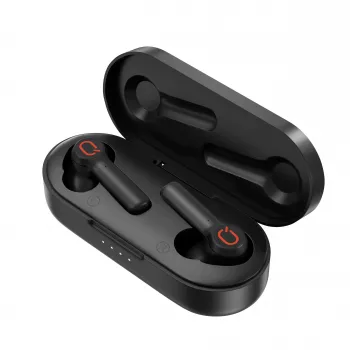
- Wireless Earbuds TWS Bluetooth 5.3 – Low Latency, HiFi Sound, Waterproof
- LED Flashlight Smart Watch with Bluetooth Calling & 100+ Sports Modes
- Elegant Women’s Large Leather Tote Bag with Chain Strap
Value and When an Upgrade Makes Sense
FAQ
Are low-latency earbuds good for mobile gaming?
They can reduce audio delay and make casual gaming feel more responsive, but results depend on your phone’s Bluetooth/codec support and how strong the connection is. If the earbuds offer a game or low-latency mode, enabling it and staying close to your device can help.
Can waterproof earbuds be used in the shower or for swimming?
Not always—many models are designed for sweat and splashes rather than full submersion. Avoid showering or swimming with them unless the listing explicitly states a submersion-safe rating, and always dry the earbuds before placing them back in the charging case.
Why do earbuds sound weak on bass sometimes?
The most common cause is an imperfect seal in the ear canal, which reduces low-frequency response. Try a different ear tip size (if available), reinsert for a tighter fit, and use EQ to add a small bass boost once the seal is secure.














Leave a comment